Capuzzella now supports Opencode Zen Gateway, giving you access to high-quality AI models from leading Chinese AI labs. Even better — Zen offers free tiers for several powerful models, making AI-powered content creation accessible without a credit card.
What is Opencode Zen Gateway?
Zen Gateway is Opencode's unified API that provides access to state-of-the-art language models from Moonshot AI, Alibaba Cloud, MiniMax, Zhipu AI, and more. Instead of managing multiple API keys and endpoints, Zen gives you one integration point with OpenAI-compatible formatting.
The models available through Zen are highly capable and excel at coding, reasoning, and content generation. Many are open-weight or come from labs with strong track records in AI research.
Free Models Available
Zen Gateway currently offers these models at no cost:
| Model | Provider | Context Window | Best For |
|---|---|---|---|
minimax-m2.5-free |
MiniMax | 1M tokens | Long-form content, document analysis |
nemotron-3-super-free |
NVIDIA | 128K tokens | Coding, reasoning, technical tasks |
ring-2.6-1t-free |
01.AI | 256K tokens | General purpose, multilingual |
Note: Free tiers typically have rate limits. For production use or higher throughput,
Zen also offers paid tiers for premium models like kimi-k2.5, qwen3.6-plus,
glm-5.1, and more.
Setup Guide: Getting Your Opencode API Key
Setting up Zen Gateway in Capuzzella takes just a few minutes. Follow these steps:
Step 1: Create an Opencode Account
- Visit opencode.ai
- Click Sign Up and create your account
- Verify your email address
Step 2: Generate an API Key
- Log in to your Opencode dashboard
- Navigate to Settings → API Keys
- Click Create New Key
- Give it a name (e.g., "Capuzzella Site")
- Copy the generated key — you'll only see it once!
Step 3: Enter Your API Key in Capuzzella
- Open your Capuzzella instance
- Click Settings in the navigation bar
- Select AI Provider from the menu
- Choose Opencode Zen as the provider
- Paste your API key in the API Key field
- Select a model from the dropdown (choose a
-freemodel to start) - Click Save
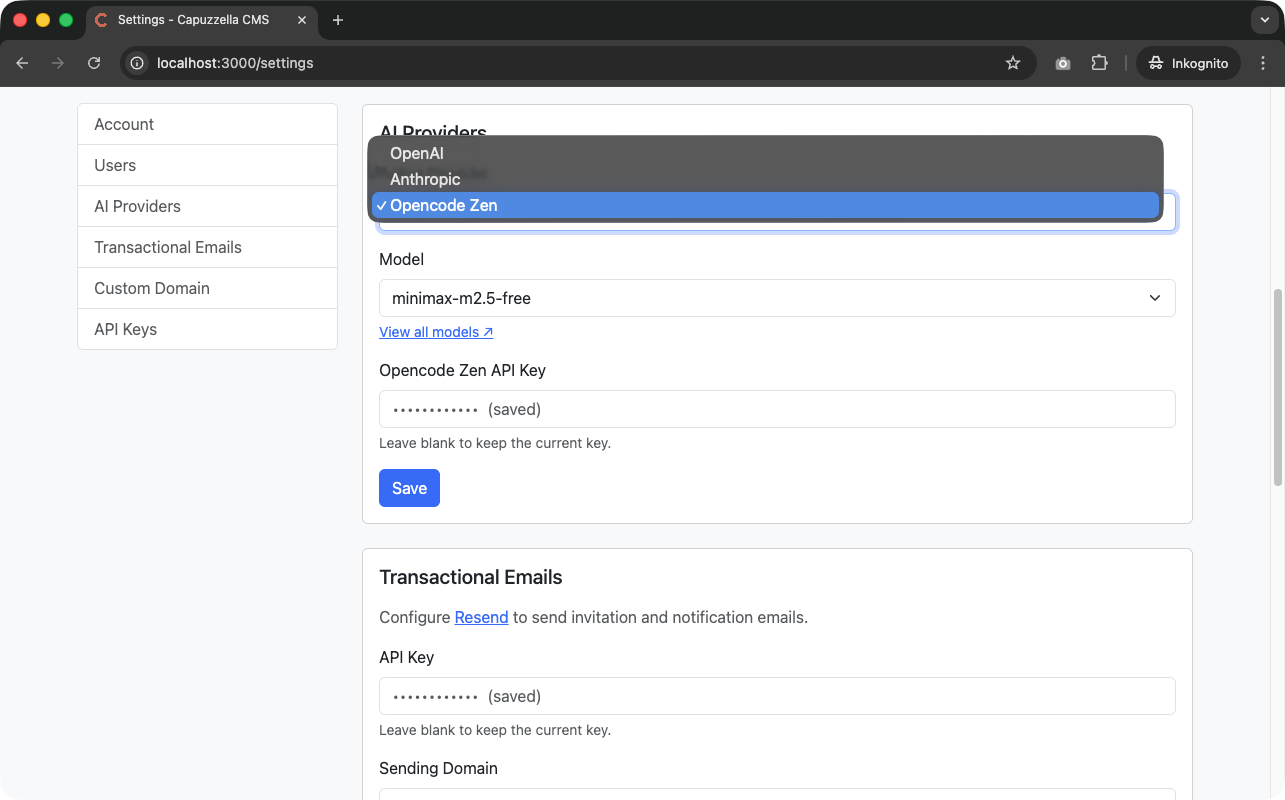
That's it! The AI chat panel will now use your selected Zen model. Test it by opening the Editor Panel and sending a message like "Create a hero section for my homepage."
Choosing the Right Model
Not sure which free model to pick? Here's a quick guide:
- minimax-m2.5-free — Recommended. Best for long documents, summaries, and when you need the largest context window (1 million tokens)
- nemotron-3-super-free — Great for coding tasks, technical content, and reasoning problems
- ring-2.6-1t-free — Solid all-rounder with good multilingual support
You can switch models anytime in Settings.
What's Next?
This is just the beginning. We'll be adding more providers and models as they become available. The goal is simple: give you choice and flexibility in how you power your AI-assisted content creation, whether that's with free models for experimentation or premium models for production work.
Have questions about Zen Gateway or need help with setup? Reach out via email at capuzzella@mauwi.me or check the official Zen documentation.