Your content, your control. Today's release adds a Download feature that lets you export all your pages and assets with a single click. Whether you need a backup, want to migrate to another platform, or simply prefer working with local files, your data is now always just one click away.
Download All Pages
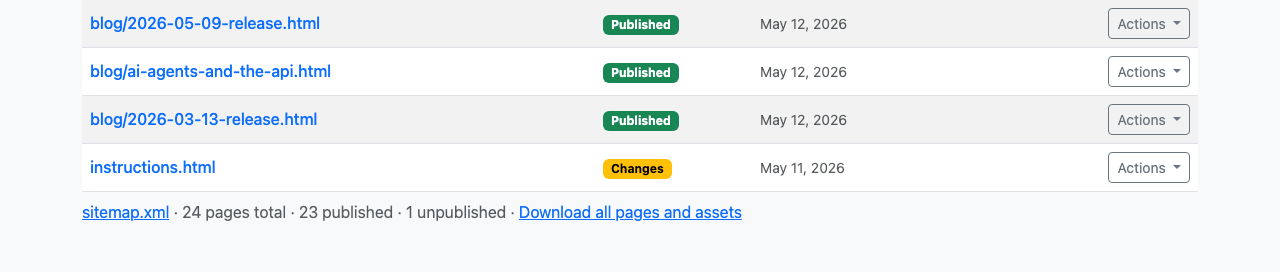
Navigate to the /pages table and scroll to the bottom. You'll find a new "Download all pages and assets" link in the table caption. Click it, and Capuzzella bundles all published HTML pages in your project into a single TAR archive and sends it to your browser.
The downloaded archive preserves your folder structure, so files in /blog/
stay in /blog/ and top-level pages remain at the root. Each file is
delivered exactly as it exists on the server, complete with all your edits, metadata,
and formatting intact.
Download All Assets
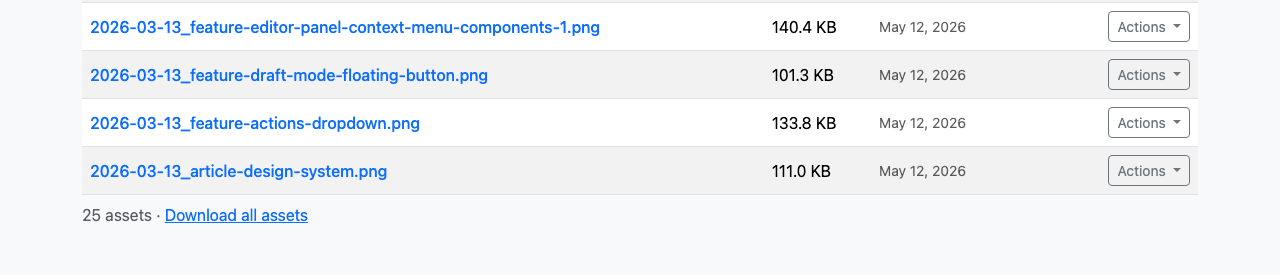
The same functionality extends to your media library. Head to /assets, scroll to the end of the table, and click "Download all assets." Every image, video, document, and file you've uploaded gets packaged into a TAR archive and downloaded to your machine.
Assets maintain their original filenames and directory hierarchy, making it easy to re-import them elsewhere or keep a local backup of your entire media collection.
CLI Commands
Power users can also trigger downloads from the command line. The Capuzzella CLI v1.4.0 now supports two new commands:
capuzzella pages download— Exports all pages as a TAR archivecapuzzella assets download— Exports all assets as a TAR archive
Install or upgrade the CLI via npm:
npm install -g capuzzellaBoth commands authenticate using your existing CLI credentials and stream the TAR directly to your working directory. This makes automated backups, CI/CD pipelines, and local mirroring trivial to set up. Visit the npm package page for full documentation.
Try It Out
The download feature is live now on every Capuzzella instance. Visit your /pages or /assets section, scroll to the bottom of the table, and click the download link to grab your first archive.
Not a customer yet? Subscribe now to get started.